Building a WhatsApp-Like 'User is Typing..' Feature with Node.js, React and Socket.io
Ever wondered how your favorite chat applications keep you engaged by showing those dynamic "X is typing..." notifications? The magic behind these real-time updates is a blend of seamless frontend design and robust backend communication. What if I told you that you could build this engaging feature yourself using Node.js and React with Socket.IO? Let’s dive into how you can implement a real-time "X is typing" feature, making your web application more interactive and user-friendly.
The Magic Behind Real-Time Messaging
Imagine you’re in a heated conversation with a friend on a chat app. Suddenly, you see "Sarah is typing..." appear above the text input box. It's a small but powerful feature that enhances the chat experience by providing real-time feedback. But how is this magic achieved?
In this blog, we’ll build a simplified version of this feature using Node.js for our backend and React for our frontend. We’ll leverage Socket.IO, a popular library that enables real-time, bidirectional, and event-based communication between the client and the server.
When building real-time applications like chat platforms or collaborative tools, efficiency and relevance in communication are key. You don’t want every user receiving every notification. For instance, in a messaging app, you wouldn’t want a user from one chat room receiving typing notifications from another chat. This is where Socket.IO rooms come into play.
Setting the Scene
Before we dive into the code, let’s set up our environment:
Node.js - A powerful JavaScript runtime for server-side programming.
React - A popular JavaScript library for building user interfaces.
Socket.IO - A library that enables real-time communication.
Our goal is to create a basic chat interface where users can type messages, and the application will display a "User is typing..." indicator whenever a user is actively typing.
What Are Socket.IO Rooms?
In simple terms, rooms in Socket.IO allow you to create isolated groups of clients that can communicate with each other without broadcasting to every connected user. When a client joins a room, they are essentially telling the server, “I’m interested in events related to this room.” This way, the server can emit events to a particular group of users without affecting others.
Step 1: Setting Up the Backend (Node.js + Socket.IO)
1.1 Install Dependencies
First, create a new Node.js project and install the necessary dependencies.
Follow my previous article to setup a typescript + nodejs server or follow the steps below for a JS one.
mkdir typing-feature
cd typing-feature
npm init -y
Install the socket.io package
npm install express socket.io
1.2 Create the Server
Create a file called server.js and set up a basic Express server with Socket.IO:
const express = require('express');
const { createServer } = require('http');
const { Server } = require('socket.io');

const app = express();
const PORT = process.env.PORT || 3001;

const server = createServer(app);
const io = new Server(server, {
  cors: {
    origin: '*',
    methods: ['GET', 'POST'],
  },
});

// Handle socket events
io.on('connection', (socket) => {
  console.log('A user connected', socket.id);

  // Join a room for typing events
  socket.on('join-room', (roomId) => {
    socket.join(roomId);
  });

  // Handle typing events
  socket.on('typing', (data) => {
    console.log(`${data.roomId} - user with id ${data.user.id} and ${data.user.username} is typing`);
    socket.to(data.roomId).emit('typing', data.user);
  });

  socket.on('stopped-typing', (data) => {
    console.log(`${data.roomId} - user with id ${data.user.id} and ${data.user.username} stopped typing`);
    socket.to(data.roomId).emit('stopped-typing', data.user);
  });

  // Handle disconnection
  socket.on('disconnect', () => {
    console.log('User disconnected:', socket.id);
  });
});

server.listen(PORT, () => {
  console.log(`Server is running on port ${PORT}`);
});
Explanation:
socket.join(roomId): The user joins a room specified in the data, this can be a group or a personal chat in our chat application.socket.on('typing'): Listens for a typing event and broadcasts it to everyone in the specified room.socket.on('stopped-typing'): Listens for when the user stops typing and emits the event to the room specified.
Now run the server:
node server.js
Step 2: Setting Up the Frontend (React + Socket.IO)
2.1 Install Dependencies
In a new React project (or an existing one), install socket.io-client to communicate with the backend:
npm install socket.io-client
2.2 Create a Socket Context
Create a SocketContext.tsx file in src/context to manage the Socket.IO connection globally using React Context:
import React, { createContext, useContext, useEffect, useState, ReactNode } from "react";
import io, { Socket } from "socket.io-client";

const SocketContext = createContext(undefined);

export const useSocket = () => {
  const context = useContext(SocketContext);
  if (!context) {
    throw new Error("useSocket must be used within a SocketProvider");
  }
  return context;
};


export const SocketProvider = ({ children })=> {
  const [socket, setSocket] = useState(null);

  useEffect(() => {
    const newSocket = io("http://localhost:3001"); // Connect to the server
    setSocket(newSocket);

    return () => {
      newSocket.close(); // Cleanup when component unmounts
    };
  }, []);

  return (
    <SocketContext.Provider value={{ socket }}>
      {children}
    </SocketContext.Provider>
  );
};
This creates a SocketProvider that connects to the backend server and provides the socket instance throughout the app.
2.3 Integrate Context in the App
In your App.tsx file, wrap the entire application in the SocketProvider so that all components can access the socket connection:
import React from "react";
import { SocketProvider } from "./context/SocketContext";
import Chat from "./components/Chat";

function App() {
  return (
    <SocketProvider>
      <Chat />
    </SocketProvider>
  );
}

export default App;
2.4 Building the Chat Component
Create a Chat.tsx component that handles sending typing events and displays when a user is typing:
import React, { useState, useEffect } from "react";
import { useSocket } from "../context/SocketContext";

const Chat = () => {
  const { socket } = useSocket();
  const [message, setMessage] = useState("");
  const [isTyping, setIsTyping] = useState(false);
  const [typingUser, setTypingUser] = useState("");

  const userId = 10; // Current user ID
  const username = "starlight"; // Current user ID
  const roomId = "The Lounge"; // Room name

  // Emit typing event when user types
  const handleInputChange = (e) => {
    setMessage(e.target.value);
    socket?.emit("typing", { roomId: roomId, user: { id: userId, username: username } , typing: true });
  };

  // Emit stop typing event after 2 seconds of inactivity
  useEffect(() => {
    let typingTimer;
    if (message) {
      typingTimer = setTimeout(() => {
        socket?.emit("stopped-typing", { roomId: roomId, user: { id: userId, username: username }, typing: false });
      }, 2000);
    }
    return () => clearTimeout(typingTimer);
  }, [message, socket, roomId, userId, username]);

  // Listen for typing events
  useEffect(() => {
    if (!socket) {
      console.log("socket not availble");
      return;
    }
    socket?.emit("join-room", roomId);

    socket?.on("typing", (data) => {
      setTypingUser(data.username);
      setIsTyping(true);
    });

    socket?.on("stopped-typing", () => {
      setTypingUser("");
      setIsTyping(false);
    });

    return () => {
      socket?.off("typing");
      socket?.off("stopped-typing");
    };
  }, [socket]);

  return (
    <div>
      <div>
        <input
          type="text"
          placeholder="Type your message..."
          value={message}
          onChange={handleInputChange}
        />
      </div>
      {isTyping && <p>{typingUser} is typing...</p>}
    </div>
  );
};

export default Chat;
Explanation:
When the user types in the input field, we emit a
typingevent.After 2 seconds of inactivity, a
stopped-typingevent is emitted.We display
username is typing...when receiving typing events from other users.
Step 3: Testing the Feature
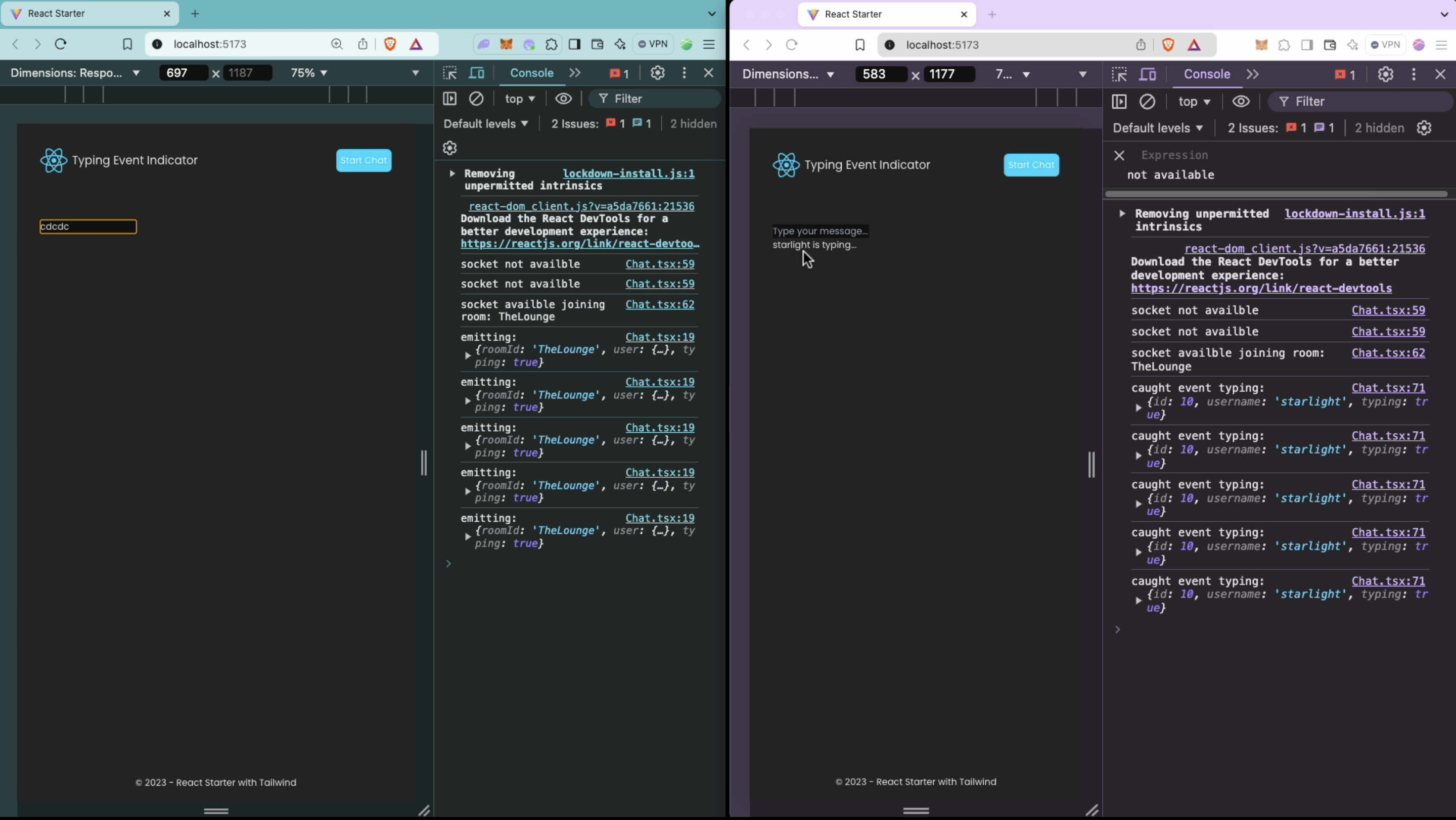
Run the backend server using
node server.js.Start the React frontend by running
npm startin your React project.Open the chat application in multiple browser tabs to see real-time typing notifications when a user is typing.
Step 4: Connecting to sockets with dynamic data (optional)
To make the React Chat component more interactive and flexible, we can modify it to accept user inputs for joining a specific room and entering a username before starting to type. This way, users will be able to choose a room and provide their display name, adding a personalized touch to the chat experience.
Here’s how we can modify the original Chat component:
Steps to Modify the Chat Component:
1. Set Up Inputs for Username and Room:
We'll add input fields for the username and room ID. These inputs will be used to customize the room the user joins and the name they use in the chat.
2. Use State for User Inputs:
We’ll manage the username and room ID using useState so that the user can set them before joining the chat room.
3. Trigger Room Join on Submit:
Once the user inputs their name and room, the chat will connect them to the selected room, allowing real-time typing notifications between users in the same room.
// src/components/Chat.tsx

import React, { useState, useEffect } from "react";
import { useSocket } from "./context/SocketContext";

const Chat = () => {
  const { socket } = useSocket(); // Get the socket from context
  const [message, setMessage] = useState<string>("");
  const [isTyping, setIsTyping] = useState<boolean>(false);
  const [typingUser, setTypingUser] = useState<string>("");

  const [roomId, setRoomId] = useState<string>(""); // Input for room
  const [username, setUsername] = useState<string>(""); // Input for username
  const [userId] = useState<number>(Math.floor(Math.random() * 10000)); // Generate random user ID
  const [hasJoined, setHasJoined] = useState<boolean>(false); // Track if user has joined the room

  // Emit typing event when user types
  const handleInputChange = (e: React.ChangeEvent<HTMLInputElement>) => {
    setMessage(e.target.value);
    if (socket && hasJoined) {
      socket.emit("typing", {
        roomId,
        user: {
          id: userId,
          username,
          typing: true,
        },
      });
    }
  };

  // Emit stop typing after a delay
  useEffect(() => {
    let typingTimer: ReturnType<typeof setTimeout>;
    if (message) {
      typingTimer = setTimeout(() => {
        if (socket && hasJoined) {
          socket.emit("stopped-typing", {
            roomId,
            user: {
              id: userId,
              username,
              typing: false,
            },
          });
        }
      }, 2000); // Stop typing after 2 seconds
    }
    return () => clearTimeout(typingTimer);
  }, [message, socket, roomId, username, userId, hasJoined]);

  useEffect(() => {
    if (!socket) {
      console.log("Socket not available");
      return;
    }

    if (hasJoined) {
      console.log("Socket available, joining room:", roomId);
      socket.emit("join-room", roomId);

      // Listen for typing events
      socket.on("typing", (data) => {
        console.log("caught event typing:", data);
        setTypingUser(data.username);
        setIsTyping(true);
      });

      // Listen for stop typing events
      socket.on("stopped-typing", (data) => {
        console.log("caught event stopped-typing:", data);
        setTypingUser("");
        setIsTyping(false);
      });

      // Cleanup listeners when component unmounts
      return () => {
        console.log("closing sockets");
        socket.off("typing");
        socket.off("stopped-typing");
      };
    }
  }, [socket, hasJoined, roomId]);

  const handleJoin = () => {
    if (username && roomId) {
      setHasJoined(true);
    } else {
      alert("Please enter a valid username and room.");
    }
  };

  return (
    <div>
      {!hasJoined ? (
        <div>
          <input
            type="text"
            placeholder="Enter username"
            value={username}
            onChange={(e) => setUsername(e.target.value)}
          />
          <br />
          <br />

          <input
            type="text"
            placeholder="Enter room to join"
            value={roomId}
            onChange={(e) => setRoomId(e.target.value)}
          />

          <br />
          <br />

          <button onClick={handleJoin}>Join Chat</button>
        </div>
      ) : (
        <div>
          <p>
            Joined room <strong>{roomId}</strong> as <strong>{username}</strong>
          </p>
          <input
            type="text"
            placeholder="Type your message..."
            value={message}
            onChange={handleInputChange}
            disabled={!hasJoined}
          />
          {isTyping && <p>{typingUser} is typing...</p>}
        </div>
      )}
    </div>
  );
};

export default Chat;
Testing
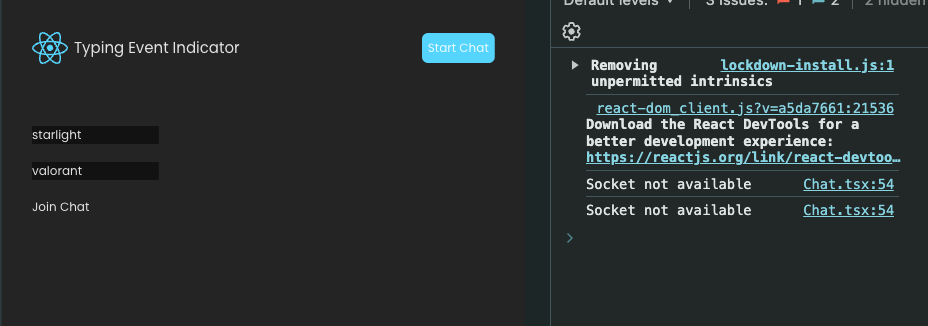
Enter username and room to join and click on join chat.
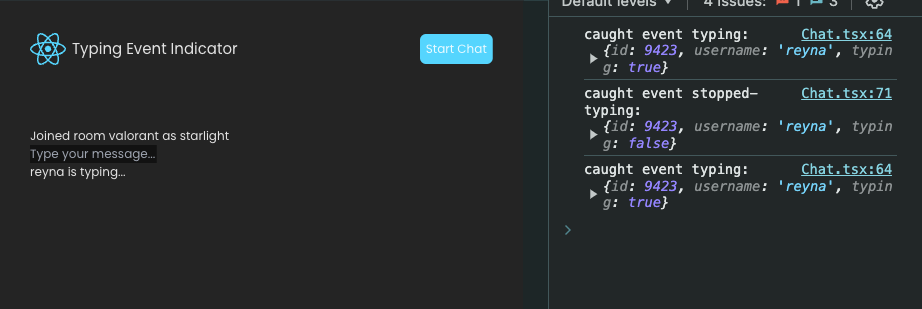
Do the same from another browser tab
Check result after you start typing in one tab.
Final Thoughts
With this setup, you've implemented a real-time "user is typing" feature using Node.js, Socket.IO, and React. This feature creates an interactive chat experience and can be further expanded with more room functionality or personalized notifications for better user interaction.
Happy coding! 🎉
About the author
I write on how to build better backend for your apps
Comments
Join the discussionGreat tutorial! Building a real-time “user is typing…” feature with Node.js, React, and Socket.io is such a valuable skill for modern developers. It’s impressive how seamlessly real-time communication can be implemented using sockets. This project is perfect for anyone learning interactive web apps. I highly recommend it to students taking WEB DEVELOPMENT COURSES who want hands-on experience with real-time functionality. It’s both practical and fun to build! a href="url">link text
Thanks for sharing this detailed guide, Aditi! The way you’ve broken down the backend and frontend setup makes it so much easier to follow. I also appreciate the optional step for dynamic room and username inputs it’s a great touch for personalization.
Have you explored any libraries or tools to test the reliability of real-time events in production? Would love to hear your recommendations!
nicely written, explained well
thank you
Backend with Nodejs
In this series, we dive deep into backend development using Node.js, focusing on building efficient, and maintainable applications.